
LedP10 : Arduino library for P10 LED Display Panels
— April 30, 2017An arduino library, written to drive popular HUB12 based single color P10 LED display panels. It uses TimerOne and SPI library of arduino.
Library features:
- Can drive up to 320×16 pixels (10 Panels connected in cascade)
- Supports dual line display, i.e. one panel divided into two.
- Supports dynamic screen refresh. You can program to display dynamic content on the panels.
- Supports different scroll speeds.
- Static and scrolling text mode. Can switch from one to another at run time.
- Supports only text based content right now.
- 256 step Brightness control.
 LedP10 Library
Installation :
- Unzip the LedP10 archive inside any directory on your machine.
- Read the readme Install file.
- Copy LedP10 folder into /Arduino/libraries of your arduino installation.
- Open arduino IDE. (You need to reopen it after installing the LedP10 library).
- In Arduino IDE, goto File > Examples > LedP10
- You will find a few example program to demonstrate the usage of our library.
- Build your own project by modifying these examples in the way you want.
Suggested Wiring to run example codes
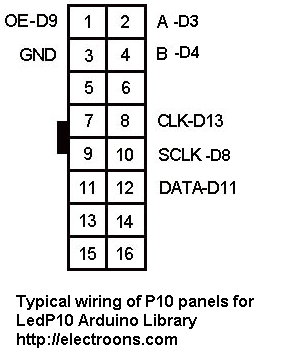
p10 Wiring LedP10 Arduino Library
LedP10 Example Codes:
Our library provides following examples that you can use to design your own LED sign board display systems:
Example -1 : Static Display with dynamic content
/*
 LedP10 Example Program
 Reads the value from ADC Channel A0 and Display on P10
 */
#include "TimerOne.h"
#include "SPI.h"
#include "LedP10.h"
LedP10 myled;
void setup()
{
     myled.init(3,4,8,9,1);
     /*
      P10 Select Line A - Arduino Pin 3
      P10 Select Line B - Arduino Pin 4
      P10 Store Line    - Arduino Pin 8
      P10 OE Line       - Arduino Pin 9
      No. of Panels     - 1 (Can be up to 10)
     */
}
void loop()
{
      int sensorValue = analogRead(A0);
      // Display sensorValue statically in single line with font 0
      myled.showmsg_single_static(sensorValue,0);
      delay(500);
}
Example 2 - Static Display with dynamic content
/*
 * This example displays an integer counter value.
 * showmsg_single_static function takes two arguments
 * first argument can be an interger value or a pointer to character string or a string in double quotes.
 * second argument is to select font, for which rwo values i.e. 0 and 1 are supported.
 */
#include "TimerOne.h"
#include "SPI.h"
#include "ledP10.h"
int num1=0;
LedP10 myled;
void setup()
{
    myled.init(3,4,8,9,1);
      /*
      P10 Select Line A - Arduino Pin 3
      P10 Select Line B - Arduino Pin 4
      P10 Store Line    - Arduino Pin 8
      P10 OE Line       - Arduino Pin 9
      No. of Panels     - 1 (Can be up to 10)
      */
}
void loop()
{
    myled.showmsg_single_static(num1,0);
    num1+=1;
    delay(500);
}
Example 3 - Double line static display
/*To display two counters of height 8 pixels.
function showmsg_double_static takes three arguments, first two can be either pointer to string or integer independently. Third argument is to select font for which only one value is supported currently i.e. 0.*/
#include "TimerOne.h"
#include "SPI.h"
#include "ledP10.h"
int num1=0,num2=1;
LedP10 myled;
void setup()
{
      myled.init(3,4,8,9,1);
      /*
      P10 Select Line A - Arduino Pin 3
      P10 Select Line B - Arduino Pin 4
      P10 Store Line    - Arduino Pin 8
      P10 OE Line       - Arduino Pin 9
      No. of Panels     - 1 (Can be up to 10)
      */
}
void loop()
{
      myled.showmsg_double_static(num1,num2,0);
      num1+=1;
      num2+=2;
      delay(500);
}
Example 4 - Single line and double line scrolling text
/*This example illustrates two user funcions of LedP10 library
First function-showmsg_single_scroll is for scroling of single message on P10 panel with 4 arguments which are message, no. of times of message scrolling, speed and font.
for message, pointer to a character string can be passed. For continuously running the message, INF can be passed in second argument, speed can be in range of 0-30, and font can be 0 or 1 as two type of fonts are currently supported for full screen messages.
For second function-showmsg_double_scroll, there would be 7 arguments, 2 for messages, two for no. of times of message scrolling, two for speed, and last one for font.
Specification being same as for single scrolling function, except only one font id provided for double scrolling and it's value should be 0.*/
#include "TimerOne.h"
#include  "SPI.h"
#include  "ledP10.h"
LedP10 myled;
void setup()
{
   myled.init(3,4,8,9,5);
       /*
      P10 Select Line A - Arduino Pin 3
      P10 Select Line B - Arduino Pin 4
      P10 Store Line    - Arduino Pin 8
      P10 OE Line       - Arduino Pin 9
      No. of Panels     - 5 (Can be up to 10)
      */
   myled.showmsg_single_scroll("this is single led test",2,3,0);
   delay(6000);
   myled.showmsg_double_scroll("this is double led test1","this is double led test2",10,INF,3,1,0);
}
void loop()
{
}
Example 5 - Brightness control
/*This example is to illustrate the use of the functon <setbrightness(uint8_t brightness)>, this function takes one argument of type uint8_t, it's value can be from 0 to 255, 255 being highest brightness and 0 is lowest.
this function can be called anytime after or before calling any other function of LedP10 library.
In this example brightness reduces when counter 'num1' reaches value of 50.
*/
#include "TimerOne.h"
#include "SPI.h"
#include "ledP10.h"
int num1=0;
LedP10 myled;
void setup()
{
    myled.init(3,4,8,9 ,1);
}
void loop()
{
   if(num1==50)
   {
      myled.setbrightness(50);
   }
   myled.showmsg_single_static(num1,0);
   num1+=1;
   delay(500);
}
Comment below to report any issues and bugs related to this Arduino library.
Ads:
 |
High Quality P10 LED Panel with connectors [Buy in India] |
 |
LED Display controller card [Buy in India] |
 |
5V / 5A or 5V/10A SMPS [Buy in India] |
 |
Arduino UNO R3 [Buy in India] |
Tagged with:
arduino library for p10 led display Arduino library for P10 led panels display P10 Arduino code P10 led interfacing arduino P10 led module arduino P10 led panel arduino P10 Library for arduino
About author

Leave a reply

18 Comments
Dear Sirs,
“TimerOne.h”
“SPI.h”
Files are missing , hence not able compliing.Arduino: 1.8.3 (Windows 7), Board: “Arduino/Genuino Uno”
C:\Users\amanulla\Desktop\LedP10\LedP10\examples\static_double_example\static_double_example.ino:7:22: fatal error: TimerOne.h: No such file or directory
#include
^
compilation terminated.
exit status 1
Error compiling for board Arduino/Genuino Uno.
This report would have more information with
“Show verbose output during compilation”
option enabled in File -> Preferences.
Hey Amanullah,
You have to install TimerOne library separately. Link to TimerOne download https://playground.arduino.cc/Code/Timer1
Thanks, Mr Samaiya,
I think that I have overcome one issue by your advice, but I get the following err msg, pl help me out
Arduino: 1.8.3 (Windows 7), Board: “Arduino/Genuino Uno”
C:\Users\amanulla\Desktop\sketch_jun21b\sketch_jun21b.ino:3:20: fatal error: LedP10.h: No such file or directory
#include “LedP10.h”
^
compilation terminated.
exit status 1
Error compiling for board Arduino/Genuino Uno.
This report would have more information with
“Show verbose output during compilation”
option enabled in File -> Preferences.
Please make sure that you have installed the library properly. Arduino is not able to locate the library. Go through the Installation instruction file in the downloaded archive.
Hi Devesh:
I think your library is very good. I have doubts:
* Why Led Display controller Card (the red PCB) is required?
* Does Arduino UNO replaces the controller card?
* I understand that 3 components are required: (1) Power Supply, (2) Arduino UNO and (3) the Led panel. Is that right?
* Is the wiring between Arduino and Panel?
Regards,
Alban
Hi,
Red LED controller card is not required. All you need is Arduino, Power Supply and Panel itself. Wiring is done from arduino to panel.
do you have tools for make custom font?
Not yet, Will post here if I find one.
static_double_example:12: error: ‘LedP10′ does not name a type
static_double_example.ino: In function ‘void setup()’:
static_double_example:16: error: ‘myled’ was not declared in this scope
static_double_example.ino: In function ‘void loop()’:
static_double_example:21: error: ‘myled’ was not declared in this scope
?????????????
Hi i want to connect P10 led modules in two rows i.e 1 feet height and 8 feet length. Can u tell me how to interface this with the arduino.
You can use two arduino for that, one arduino for 1 row of 8 panels and another arduino for another row of 8 panels.
I tried almost everything, but it kept saying “fatal error: ledP10.h: No such file or directory”.
Problem persist even after include library option.
Any clue about this?
Please make sure that the library is properly installed at correct location.
Hi, can you give me the FontCreator written by F. Maximilian Thiele. I followed the link http://www.apetech.de/fontCreator but the site died!
Thank you so much.
Please send to my email: caonam@gmail.com
Great instructions, very clear and easy to follow.
I downloaded the library and connected as suggested. The problem is that I am getting random dots on the DMD instead of the text message.
Please note that I tried with another display driver board (the BX-5T) and the display is working properly so what could be the problem?
Can you please help. I am using Arduino pro mini board and a generic P10 16×32 red display module.
Thanks and regards
Please make sure that you have made all the connections properly and configured same pins in the code. If problem still persists please comment here and I will try my best to rectify it.
Also, on your Arduino board please verify the MOSI and SCK pins are same as shown in the connection diagram.
this library is not working
Arduino: 1.8.4 (Windows 7), Board: “Arduino/Genuino Uno”
Invalid library found in C:\Program Files (x86)\Arduino\libraries\LedP: C:\Program Files (x86)\Arduino\libraries\LedP
Invalid library found in C:\Program Files (x86)\Arduino\libraries\LedP: C:\Program Files (x86)\Arduino\libraries\LedP
Invalid library found in C:\Program Files (x86)\Arduino\libraries\LedP: C:\Program Files (x86)\Arduino\libraries\LedP
Invalid library found in C:\Program Files (x86)\Arduino\libraries\LedP: C:\Program Files (x86)\Arduino\libraries\LedP
Invalid library found in C:\Program Files (x86)\Arduino\libraries\LedP: C:\Program Files (x86)\Arduino\libraries\LedP
Invalid library found in C:\Program Files (x86)\Arduino\libraries\LedP: C:\Program Files (x86)\Arduino\libraries\LedP
Invalid library found in C:\Program Files (x86)\Arduino\libraries\LedP: C:\Program Files (x86)\Arduino\libraries\LedP
Specified folder/zip file does not contain a valid library
Invalid library found in C:\Program Files (x86)\Arduino\libraries\LedP: C:\Program Files (x86)\Arduino\libraries\LedP
Invalid library found in C:\Program Files (x86)\Arduino\libraries\LedP: C:\Program Files (x86)\Arduino\libraries\LedP
This report would have more information with
“Show verbose output during compilation”
option enabled in File -> Preferences.