
Know How : Using GSM Modem - Part 2/2
— February 24, 2014SETTING UP THE COMMUNICATION
- Connect one end of the serial or Usb to serial cable to your system but do not connect it to the GSM modem.
- Go to File>Properties>Settings> ASCII Setup
- Select the Check Boxes as shown in figure.
- Click OK
- Now simply Connect the Pin2 (Receive Data) and Pin3 (Transmit Data) pins of the open end of the serial cable/ usb to serial cable using a Jumper or a small wire as shown while the other end of the cable is connected to your system
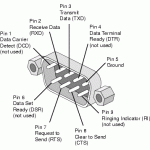
- Now try typing anything in the HyperTerminal, it should send the same character back i.e. each character would get typed two times automatically. Change the cable if it doesn’t work.
TESTING AT COMMANDS
- Now connect the serial cable to the modem.
- Switch Off the gsm modem and switch it On again.
- Wait for the following response in HyperTerminal.
                   RDY
                   +CFUN: 1
                   +CPIN: READY
                   Call ready
- Instead if this is received:
                    RDY
                    +CPIN: NOT INSERTED
                    +CFUN: 1
This indicates SIM is not inserted Properly.
- Type “AT” in the terminal and press ENTER. An “OK” as response must be received.
- This completes the testing part.
AT COMMANDS OVERVIEW
BASIC SYNTAX
These AT commands have the format of “AT<x><n>”, or “AT&<x><n>”, where “<x>”is the command, and “<n>”is/are the argument(s) for that command.
An example of this is “ATE<n>”, which tells the DCE whether received characters should be echoed back to the DTE according to the value of “<n>”. “<n>” is optional and a default will be used if missing.
|
Test command |
AT+<x>=? |
The mobile equipment returns the list of parameters and value ranges set with the corresponding Write command or by internal processes. |
|
Read command |
AT+<x>? |
This command returns the currently set value of the parameter or parameters. |
|
Write command |
AT+<x>=<…> |
This command sets the user-definable parameter values. |
|
Execution command |
AT+<x> |
The execution command reads non-variable parameters affected by internal processes in the GSM engine |
PROFILE COMMANDS
Demonstration |
Syntax |
Expect Result |
|
The AT command interpreter is actively responding to input. |
AT |
OK |
|
Display product identification information: the manufacturer, the product name and the product revision information. |
ATI |
SIMCOM_Ltd SIMCOM_SIM300 Revision:1008B10SIM300M32_SPANSION |
|
Checking Current Date and Time |
AT+CCLK? |
+CCLK: “03/01/01,12:00:35+00″ |
SIM COMMANDS
Demonstration |
Syntax |
Expect Result |
|
Listing available phonebooks, and selecting the SIM phone book. |
AT+CPBS=? AT+CPBS=”SM” |
+CPBS:(“DC”,”FD”, ”LD”,”ON”,”SM”,”MC”) OK |
|
Displaying the ranges of phone book entries and listing the contents of the phone book. |
AT+CPBR=? AT+CPBR=1,10 |
+CPBR:(1-150),41,14 [a listing of phone book |
|
Writing an entry to the current phonebook. |
AT+CPBW=,”13918 18xxxx”, ,”Daniel” AT+CPBR=1,10 |
OK [a listing of phone book contents] |
|
Finding an entry in the current phonebook using a text search. |
AT+CPBF=”Daniel” |
+CPBF: 5,”139181860 89”,129,”Daniel” |
|
Deleting an entry from the current phonebook specified by its position index. |
AT+CPBW=2,” ” AT+CPBR=1,10 |
OK [a listing of phone book contents] |
|
Displays the current network operator that the handset is currently registered with. |
AT+COPS? |
+COPS: 0,0,”AIRTEL” |
|
Display a full list of network operator names. |
AT+COPN |
AT+COPN +COPN:”20201”, “COSMO” |
|
Check SIM Number |
AT+CNUM |
+CNUM: “”,”987656xxxx”,129,7,4 |
|
Signal Strength Indicator |
AT+CSQ |
+CSQ: 31,0 |
CALL CONTROL COMMANDS
Demonstration |
Syntax |
Expect Result |
|
Make a voice call |
ATD6241xxxx; |
OK MS makes a voice call |
|
Hang up a call |
ATH |
OK Call dropped |
|
Attend a call |
ATA |
OK |
|
Make a voice call using the last number facility. The initial call is established then cancelled. The second call is made using the previous dial string. |
ATD6241xxxx; ATH ATDL |
OK OK |
|
Checking SIM Balance and Validity |
ATD*123# AT+CUSD=1,”*123#”,15 |
+CUSD: 0,”Your balance is Rs…” OK |
SMS COMMANDS
Demonstration |
Syntax |
Expect Result |
|
Set SMS system into text mode, as opposed to PDU mode. |
AT+CMGF=1 |
OK |
|
Send an SMS to myself. |
AT+CMGS=”+861391818xxxx” >This is a test |
+CMGS:34 OK |
|
Read SMS message that has just arrived. Note: the number should be the same as that given in the +CMTI notification. |
AT+CMGR=1 |
+CMGR: “REC UNREAD”, “+8613918186089”, ,”02 /01/30,20:40:31+00” This is a test OK |
|
Listing all SMS messages. Note:”ALL” must be in uppercase. |
AT+CMGL=”ALL” |
+CMGL: 1,”REC READ”,”+8613918186089”, , “02/01/30,20:40:31+00” This is a test
|
|
Delete an SMS |
AT+CMGD=1 |
OK OK |
About author


Leave a reply